Executive Summary
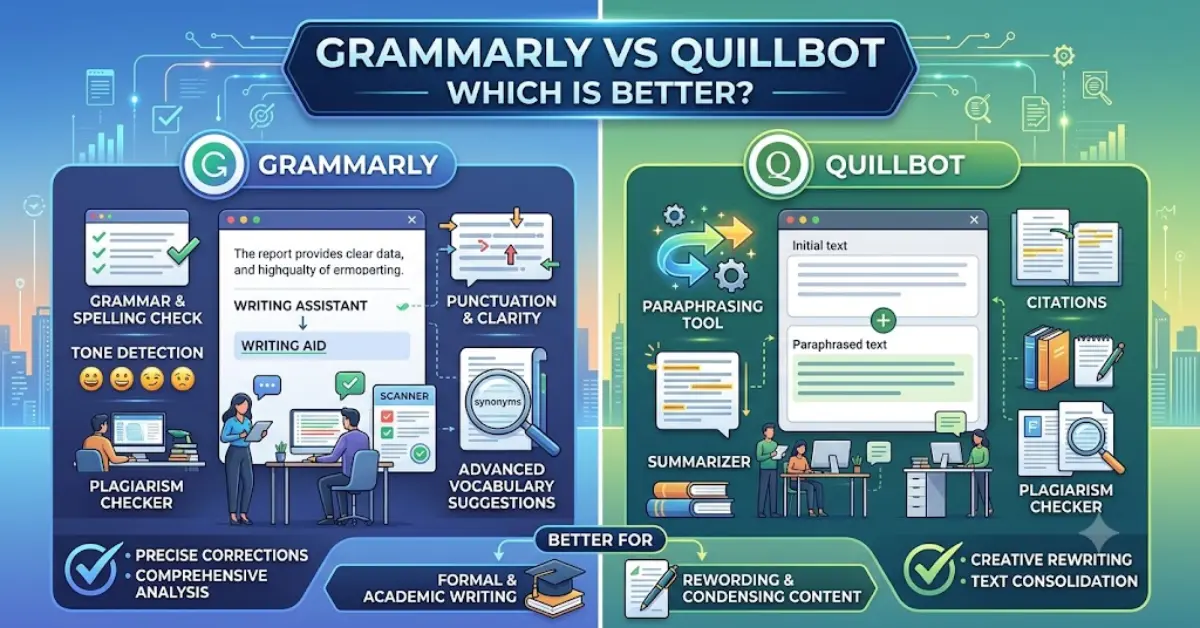
Grammarly and QuillBot are both popular AI writing assistants, but they serve different primary purposes. Grammarly is an all-in-one proofreading and writing enhancement tool, offering advanced grammar, spelling, punctuation and style suggestions, tone detection, and easy integration with countless apps. QuillBot, on the other hand, began as a powerful paraphrasing engine and has since added tools like summarization, translation, and citation generation. In practical terms, Grammarly excels at polishing text – catching nuanced grammar errors and improving clarity – while QuillBot shines at rewriting and repurposing content. As summarized below, the “better” choice depends on your needs: use Grammarly if you need comprehensive proofreading and writing insights, especially in English; use QuillBot if you mostly need paraphrasing, multilingual support, or budget-friendly tools.
Introduction (Grammarly vs QuillBot Overview)
- Grammarly and QuillBot are both AI-powered writing partners, but they differ fundamentally in focus and features. Grammarly is an “all-in-one” writing assistant built for professionals and students who want error-free, polished English text. It provides real-time grammar/spell checking, vocabulary enhancements, tone analysis, and even AI-generated suggestions (via GrammarlyGO) for brainstorming and writing help. QuillBot, in contrast, is known chiefly for its paraphraser.
- It offers multiple rewriting modes (Formal, Fluency, Creative, etc.), a summarizer, translator (50+ languages), citation generator, and more.
- QuillBot is often used by students and content creators to rephrase text for originality or brevity. Both tools include basic grammar checks and online editors, but Grammarly focuses on one’s writing from scratch, whereas QuillBot focuses on transforming existing text.
Grammar & Spell Checking

- Grammarly’s grammar checker is its core strength. It analyzes sentence structure, verb tense, punctuation, and style, offering detailed suggestions (even for wordy or passive constructions). For example, it will flag misuse of words (“less” vs. “fewer”) and explain corrections.
- It also provides inclusive-language prompts and advanced fluency edits as part of Premium. QuillBot includes a grammar/spell checker too, but it’s much more basic – mainly catching obvious spelling errors and simple grammar mistakes. QuillBot’s interface is straightforward but “not a robust grammar checker” by Grammarly standards.
- In practice, Grammarly will catch nuanced errors that QuillBot can miss. For example, a Kindlepreneur review notes that QuillBot’s checker “does a decent job of finding errors to fix, but its interface is basic, and it doesn’t have the complexity that you get with a service like [Grammarly]”.
In short, grammar checking is a tie only in the sense that both tools attempt it; Grammarly is significantly stronger and more comprehensive. Non-native English users often appreciate Grammarly’s in-depth guidance, while QuillBot’s checker is useful for a quick sanity check but not sufficient as a standalone proofreader.
Paraphrasing and Rewriting
This is QuillBot’s home turf. QuillBot offers an advanced paraphrasing tool with multiple modes (Standard, Fluency, Creative, etc.) and a synonyms slider to control how radically text is rewritten. Premium users get unlimited paraphrasing and access to all modes. QuillBot also features a summarizer, a researcher/“Co-writer,” and a citation generator – all designed for rewriting and condensing content. DemandSage notes that “Quillbot is primarily known for its outstanding paraphrasing capabilities” and “absolutely wins” in this category. You can paraphrase long passages in seconds, and even translate them into other languages if needed.
- Grammarly, by contrast, does not have a dedicated paraphrasing tool. It can rephrase short sentences on-the-fly (e.g. reducing wordiness or shifting passive to active), but it lacks an explicit “rewrite” function. In effect, Grammarly’s rewriting help comes in the form of suggestions to clarify or shorten prose, not a full-text rewriter. If you try to use Grammarly for paraphrasing, you’ll find it limited. As one review bluntly states, “Grammarly doesn’t specifically have a paraphrasing feature or tool, whereas Quillbot is primarily known for its outstanding paraphrasing capabilities”.
- In summary, QuillBot is far superior for paraphrasing and content rewriting. Use QuillBot when you need to reword or summarize existing text. Grammarly should be reserved for editing and polishing content, not heavy rewriting.
Plagiarism Detection
Both services offer plagiarism checkers, but with key trade-offs. Grammarly’s plagiarism detector (part of Premium) scans content against billions of web pages and academic sources, and allows unlimited checks. However, multiple tests have found Grammarly’s accuracy to be lacking. For example, an independent study reported Grammarly detected only ~3% of plagiarized text in a sample. In practice, users say its scanner is okay for quick checks but will miss many copied passages.
- QuillBot’s plagiarism checker (also Premium) is generally more accurate in head-to-head tests. Eesel’s analysis notes QuillBot detected 99.7% of plagiarized text in one test, and DemandSage found QuillBot “comes closer to finding plagiarized content” than Grammarly.
- The downside is usage limits: QuillBot allows up to 20 pages/month on Premium (each “page” = ~250 words). This low cap means heavy users must upgrade frequently or run multiple checks. Grammarly, by contrast, has no page limit on its plagiarism checks, which is useful for large-volume projects.
Verdict: QuillBot’s plagiarizer is more effective at catching copied material, but Grammarly allows more scans. For casual use, QuillBot gives more accuracy per check; for enterprise use, Grammarly offers unlimited checking (at the cost of some missed matches).
Writing Suggestions (Style, Tone, Vocabulary)
Grammarly goes well beyond basic grammar. Its Premium version provides tone detection and suggestions to make writing clearer, more engaging, and on-brand. For instance, Grammarly will flag wordiness, suggest active voice, adjust formality, and even recommend stronger vocabulary. It has features like readability enhancements and “clarity improvements” to make text concise. G2 user reviews praise Grammarly’s style and tone suggestions, noting how “its AI-powered improvement suggestions” set it apart by not only correcting grammar but improving overall writing.
- QuillBot has a simpler “AI Humanizer” that can rephrase text to sound more natural, and in Premium it provides a “human score” with limited tone guidance.
- However, it lacks the breadth of Grammarly’s style tools. QuillBot’s main support here is limited to paraphrasing modes and a basic tone analysis in its paraphraser, not a dedicated style editor. As Eesel notes, Grammarly covers style, clarity, and vocabulary improvements, whereas QuillBot “only offers tone assistance” besides paraphrasing. In practice, Grammarly will catch subtle issues like passive voice or unclear phrasing that QuillBot will not.
Example: Grammarly’s website touts “tone suggestions that help your words be well received”, which is a real feature: it might warn that a sentence sounds overly blunt and offer a softer alternative. QuillBot has no direct equivalent aside from choosing a more formal paraphrase mode.
Integrations & Platform Support
Grammarly is extremely versatile in where it works. It boasts compatibility with over 500,000 apps and websites. This includes browser extensions (Chrome, Edge, Firefox, Safari), Microsoft Office add-ins, Google Docs integration, desktop applications for Windows/Mac, and even mobile keyboards for iOS/Android. You can use Grammarly in Gmail, Slack, Twitter, LinkedIn, Word, and virtually anywhere you write text.
- QuillBot’s integrations are more limited. It offers a Chrome extension and a Microsoft Word add-in, covering web editors and Word documents.
- However, QuillBot has no dedicated desktop app or mobile app of its own (you must use the website or extensions). In short, Grammarly is available “everywhere,” while QuillBot works mainly in browsers/Word. G2 reviewers confirm this:
- They highlight Grammarly’s seamless integration across platforms, whereas QuillBot’s reach is narrower.
Pricing and Plans
Both tools offer free and paid plans, but pricing and limits differ.
- Grammarly: The Free plan includes basic spelling/grammar checks and 100 AI-generated prompts per month. Premium (called “Pro”) starts around $12 per month (billed annually). Premium unlocks advanced grammar/style suggestions, tone adjustments, and unlimited suggestions. It also includes plagiarism detection, AI text detection, sentence rewrites, and up to 2,000 AI prompts/month. An Enterprise plan offers team features and enhanced security for organizations. Importantly, Grammarly’s plagiarism and AI detectors are only in paid tiers.
- QuillBot: The Free plan allows up to 125 words per paraphrasing attempt, two rewriting modes, basic grammar checking, and limited use of the AI tools. QuillBot’s Premium (starts ~$8.33/mo annual) removes most limits: unlimited paraphrasing words, all writing modes unlocked, advanced grammar suggestions, full access to the Summarizer and Citation Generator, unlimited AI-detector scans, etc. Premium still caps the plagiarism checker at 20 pages/mo. QuillBot also offers a Team plan with usage metrics and admin controls. In short, QuillBot’s paid tier costs less ($8.33/mo) and is often cited as very affordable.
- Comparison: Grammarly is generally more expensive (~$12 vs $8.33). Both have robust free plans, but Grammarly’s free plan is stronger on grammar/spelling, whereas QuillBot’s free plan uniquely provides free paraphrasing and summarization (with limits). DemandSage points out that “QuillBot is the cheaper and more cost-effective option” in this comparison.
Ease of Use & User Experience
Both tools aim to be user-friendly. QuillBot’s interface is clean and intuitive: you paste text on the site and immediately see paraphrased output or highlighted grammar issues. Users often praise how easy it is to get started with QuillBot. Grammarly has a slightly steeper learning curve due to the number of features and suggestions it provides, but its UI is polished and integrates into your writing apps. G2 reviewers note that “QuillBot shines in its user-friendliness and speed” while Grammarly has more depth.
- Both provide cloud-based editors and browser extensions, so ease of use mostly comes down to personal preference. QuillBot may feel simpler since it does one main job at a time, whereas Grammarly offers many functions in one dashboard. In our view, neither is hard to use: QuillBot for quick rewriting tasks, Grammarly for comprehensive editing.
Language Support
Grammarly is focused on English (US, UK, Canadian, Australian variants). Its support for other languages is minimal – aside from some UI translation, Grammarly’s suggestions only work on English text. QuillBot, however, explicitly supports multiple languages. It offers a Translator tool for 50+ languages (including major European and Asian languages), and the paraphrasing tool can handle content in languages like French, German, Portuguese, and Spanish. For non-English writers or multilingual projects, QuillBot has a clear advantage.
Customer Support & Privacy
- Customer Support: Grammarly provides 24/7 online support resources (help center, email support) and offers priority support for business customers. Enterprise accounts can get dedicated account managers and live support. QuillBot offers email support and an FAQ section. It does not advertise dedicated enterprise support or 24/7 help for free users.
- Privacy and Security: Grammarly emphasizes strong security: its infrastructure is SOC 2 Type II certified and meets enterprise-grade privacy standards. It explicitly states it uses encryption and strict controls.
- QuillBot’s published policies mention standard industry security practices (data encryption in transit, GDPR compliance, etc.), but it does not have a publicly cited SOC 2 report. Both companies claim to protect user data, but Grammarly’s documentation is more detailed. Users concerned about enterprise security may favor Grammarly’s explicit certifications.
Pros and Cons
Grammarly Pros:
- Superior grammar and style checking with detailed explanations.
- Tone detection and vocabulary enhancements.
- Massive integration support (Works wherever you write).
- Unlimited plagiarism checks on Premium.
- Strong privacy/security certifications (SOC 2).
- Scales for teams (style guides, admin controls).
Grammarly Cons:
- Higher cost (~$12/month).
- Free plan is quite limited (no paraphrasing, no plagiarism, no advanced suggestions).
- Only supports English writing.
- Desktop/mobile apps only by subscription.
QuillBot Pros:
- Best-in-class paraphrasing: multiple modes, unlimited with Premium.
- Support for many languages (paraphrase & translate).
- Very affordable ($8.33/mo).
- Generous free usage: includes paraphrasing and summarizing.
- Simple, fast interface (users praise its ease).
- Useful extra tools (summarizer, citation, image generator, etc.).
QuillBot Cons:
- Grammar checker is basic; misses nuanced errors.
- Plagiarism checker severely limited (20 pages/mo).
- Limited integrations (browser & Word only).
- No dedicated desktop/mobile apps.
- Fewer advanced style/tone suggestions.
Who Should Use Which Tool?

- Choose Grammarly if: You need a comprehensive writing assistant for proofreading, editing, and style guidance. Its detailed grammar and tone suggestions make it ideal for professionals, marketers, academics, and anyone whose main goal is error-free, polished English. Grammarly is best when integration across apps (email, docs, social media) and enterprise features (team style guides, security) matter.
- Choose QuillBot if: You frequently paraphrase, summarize, or translate content. QuillBot’s advanced rewriting modes and extra tools (summarizer, translator, citation) excel at repurposing text, which is useful for students, academics, and content creators. It’s also the budget-friendly choice if cost is a concern. Many users employ a combined workflow: “use QuillBot first to paraphrase or refine a draft, then run it through Grammarly for a final proofread”.
- Special cases: For team or enterprise settings needing consistent brand voice and style enforcement, Grammarly Business is superior. For multilingual projects or creative rewriting, QuillBot is more suited. If you only need quick grammar fixes, Grammarly’s free plan suffices; if you need short paraphrases for free, QuillBot’s free tier offers that unique capability.
FAQs: Grammarly vs QuillBot Which is Better
1. Grammarly vs QuillBot Which is Better for students?
Both are useful, but they serve different purposes. Grammarly is better for fixing grammar, spelling, and punctuation. QuillBot is better for rewriting sentences and avoiding repetition. Many students use both together.
2. Is QuillBot better than Grammarly?
QuillBot is better for paraphrasing and rewriting content. Grammarly is better for grammar checking, writing clarity, and proofreading. The better choice depends on your needs.
3. Can I use Grammarly and QuillBot together?
Yes. Many writers first use QuillBot to rewrite their text and then use Grammarly to check grammar, spelling, and readability before publishing.
4. Which tool is better for SEO writing?
Grammarly is better for improving readability and removing grammar mistakes. QuillBot helps rewrite sentences and create unique wording. Using both can improve SEO content quality.
5. Does Grammarly detect AI-generated content?
Grammarly offers AI writing features and AI detection in some plans. However, no AI detector is 100% accurate, so results should be used as guidance rather than proof.
6. Is QuillBot free to use?
Yes. QuillBot has a free version with limited features. The Premium plan unlocks more writing modes, faster processing, and longer text limits.
7. Which tool is best for professional writers?
Professional writers often prefer Grammarly for editing and proofreading. QuillBot is helpful when they need to rewrite sentences, improve flow, or remove repetitive wording.
8. Grammarly vs QuillBot Which is Better overall?
If your main goal is grammar correction and polished writing, Grammarly is the better choice. If you need powerful paraphrasing and rewriting, QuillBot is the better option. For the best results, many users combine both tools in their writing workflow.
Final Verdict
Grammarly and QuillBot each shine in their own niche. Grammarly is the better grammar and style checker – it will catch more errors and improve your writing quality. QuillBot is the better paraphrasing and multilingual tool – it rewrites text far more effectively and supports multiple languages. In a head-to-head test, if your priority is polishing prose, go with Grammarly; if your priority is rewriting and content repurposing, QuillBot wins. For many users, the optimal solution is to leverage both: use QuillBot to rephrase or outline, then use Grammarly to perfect the final draft.